Bringing Concepts to Life

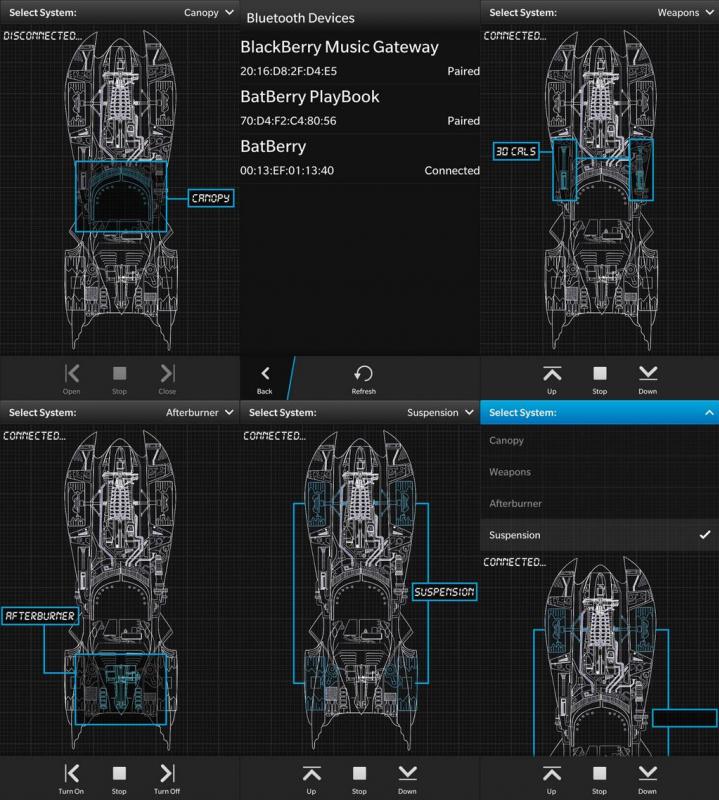
After we did the rudimentary work on the BatBerry software that was connected to the Arduino board, I did a re-design of the interface using the Cascades native technology for my BlackBerry Smartphone. The above screen shots show six different screens/states of the application where you can choose the system you wish to control from…

By

BatBerry Software Re-Design

After we did the rudimentary work on the BatBerry software that was connected to the Arduino board, I did a re-design of the interface using the Cascades native technology for my BlackBerry Smartphone.

The above screen shots show six different screens/states of the application where you can choose the system you wish to control from a dropdown and then select the buttons on the toolbar to perform the desired actions.

It still requires some tweaking and it has all the same functions as the utilitarian controller software but with some more pizzazz and some nice wireframes, flashing text and animation effects 🙂
BbJmnspCUAE8pt0

3 responses to “BatBerry Software Re-Design”

  1. robwilliamsjnr Avatar
    robwilliamsjnr

    Looking good!!!

    1. brcewane Avatar

      Thanks Rob! I still have to add a few more Relays to the Arduino and software for a few single pole functions like popping the trunk, turning on/off the afterburner and firing the 30Cals 🙂

      But it’s coming along nicely.. Thanks again for all your help!

  2. A Closer Look at the Software | Building The BatBerry Avatar

    […] at the software on my BlackBerry Z10 that I use for the BatBerry’s systems.  I previously posted some screen shots but I always feel that it’s nicer to actually see an app functioning than static images […]

Leave a reply to robwilliamsjnr Cancel reply